Navigate
Products
Download
eShop
Upgrade
About
Training
Support


Navigate
Products
Download
eShop
Upgrade
About
Training
Support


Since 1997
If you are interested in machine embroidery and you are looking for a reasonably priced application that helps you digitize new embroidery designs and organize and customize existing ones, Embird is the solution you need.
Try our design splitting tools, quilt fills, embroidery lettering from ttf and otf fonts or our ultra realistic photo-into-embroidery conversion module Sfumato Stitch. Of course, Embird has also a digitizer module with palette of digitizing instruments from precise node-by-node digitizing up to automatic tracing.
 Compatibility
 File Formats
Thread Catalogs
File Formats
Thread Catalogs
Whether your primary embroidery software or additional tool for everyday embroidery work, Embird is a versatile software independent on any particular embroidery machine and designed for all embroiderers and digitizers, either professionals or hobbyists.
Interconnect your machine embroidery realms with Embird's support for more than 70 embroidery file formats for home and industrial embroidery machine brands. Embird allows also import and conversion of SVG and other graphics vector files, which bridges your graphic programs and the world of machine embroidery.
We, authors of Embird, are digitizers ourselves. We build our software functionality on our own first-hand digitizing and customizing experience.
Computerized embroidery machines use special input files that instruct them how to sew out the embroidery on a fabric. These input files are digital stitch files, called embroidery designs. Creation of the embroidery design from artwork, photo or from imagination is called embroidery digitizing.
Utilize our tools for your creative embroidery designs digitizing, editing, customization, conversion, lettering and cross stitch. Scale and resize your designs, separate, edit, display, print and convert photos and other images into machine embroidery designs.
Training section of this site contains hundreds of text guides, digitizer advice and number of video tutorials about Embird software and also about machine embroidery in general. Moreover, we have a support team ready to answer your questions via e-mail.
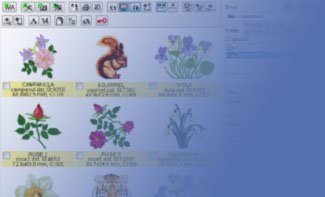
Preview, organize and process machine embroidery files
Embroidery file converter. Convert designs - whole batch to multiple formats, including Quilting
Supports 70+ file formats for home and industrial embroidery machines
View designs - either single or thumbnails - in 1:1, Normal, 3D, Density Map, X-ray
Print designs - detail documentation, thread list, color layers, thumbnails
Copy/Paste/Create shortcuts to organize embroidery designs
Modify colors, choose threads from thread catalogs
Zip/Unzip embroidery files
Export to machine embroidery cards, USB, floppy disks, via serial link
Export various types of design documentation in .BMP, .JPG, .PNG
Browse through folders
Search designs
Send designs in e-mail
Simple embroidery file manager included
Slide Show of designs in Viewer mode
Works also with images - view/convert/rotate/mirror/re-size
See embroidery design file content instead of universal icon in Windows File Explorer (WFE)
See Preview of design file with color list and dimensions in WFE
The design file content is shown also in all Open/Save dialogs in Windows
Design preview in popup menu in WFE
Great for organizing embroidery designs in WFE
Customize machine embroidery designs
Split, Combine designs
Delete part of designs - selected areas, colors, stitch codes
Re-size with stitch density adjustment
Center, Mirror, Rotate, Set Position in hoop, Auto-Repeat, Corner
Edit/Add/Remove single stitch points
Smart sort colors, Reduce number of colors in design
Change embroidery hoop size
Print design documentation to multiple sheets of paper
Insert Basting stitches, Cross reference lines
Insert Fabric Flattening Stitches
1:1, Normal, 3D, Density Map and X-ray design view mode
Recognize contours in "clipart-alike" images and fill them with chosen pattern
Fill empty design area with chosen pattern
Modify colors, choose threads from thread catalogs
Check designs embroidery in Sew Simulator
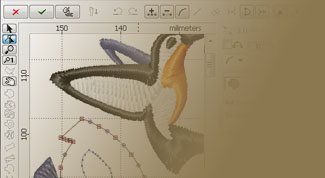
Digitize your own machine embroidery designs
Digitizing vector objects, stitches generated automatically
Save finished design in 70+ file formats for home and industrial embroidery machines
Optional underlaying raster picture as a template for digitizing
Adjustable creative and technical parameters of digitized objects
Node-by-node digitizing mode
Object inspector
Tools to transform and align objects
Embroidery Thread catalog
3D, X-ray, density map view modes to preview design
Editors for custom fill patterns, outline samples, border samples and fill motifs
Trace digitizer tool to convert jpg or png to embroidery design
Import vector graphic files (Font Engine required)
Lettering and Monogram Tool for Embird Alphabets and Font Engine (TrueType and OpenType fonts)
Automatic Outlines digitizer tool
Fills with multiple motifs
Check design embroidery in Sew Simulator
Freehand digitizing tool
Corner mirror tool
Auto-repeat tool
Stitch analysis tool
Embroidery lettering and monograms digitizer
Create embroidery lettering from TrueType and OpenType fonts
Plain fill, Auto column, Motif fills and various outlines are available
Nearest-point connections to remove the need for jump stitches between characters
Adjust gaps, rotation, size, angle of individual characters
Various baselines supported: line, circle, wave, spiral, slash, custom baseline
Insert clock/calendar/multi-line text
Unlocks Ready-made Alphabet mode, which allows to map 3rd party "char-per-design" alphabets to keyboard and use them easily in Embird
Unlocks import and stitching of 3rd party vector files in Digitizing Tools
Photorealistic embroidery digitizer from jpg or png images
Convert photos into machine embroidery designs
Save digitized design in 70+ file formats for home and industrial embroidery machines
Suitable for digitizing portraits, still-lives, landscapes or animal designs
Digitizing of multi-colored, monochrome or sepia designs
Machine Cross Stitch digitizer application
Crosses, Pixels, Back stitch lines and French knots are supported
Digitize cross stitch designs manually, or auto-digitize from imported "clipart-alike" bitmap
Save finished design in 70+ file formats for home and industrial embroidery machines
Import charts, align them and use as background for placing crosses
Insert text using TrueType fonts, or Simple outline text
Fill empty area with chosen pattern from library
Create your own fill patterns
Create cross stitch design from normal machine embroidery design
Print charts, either in color or as B&W
Normal, 3D, Density Map and X-ray design view mode